The simplest Brick alternative on iPhone is an app that unlocks with an ordinary NFC sticker instead of Brick's $59 device. Stillock's Tag to unlock does this: you register any NFC tag, start a session, and only that tag can end it early. You keep the walk-to-unlock friction and add schedules, daily limits and Pomodoro, for a subscription instead of hardware.
Disclosure: We make Stillock. Prices and features of other apps were checked on November 5, 2026 and link to their sources; tell us if something is out of date.
What Brick does well
Brick deserves its reputation, and it is worth being clear about why before comparing anything.
One simple ritual. You tap your phone on the Brick to block your chosen apps, and you tap it again to get them back. Brick's FAQ is blunt about the rule: "You will still need the physical device to unbrick." That clarity is the product. There is no setting to talk yourself out of, only an object in another room.
Something you can hold. A physical device is easy to understand, easy to give as a present and easy to leave at home on purpose. For many people, the object on the shelf is a better reminder than any app icon.
Mainstream, hands-on reviews. Brick has been tested by large outlets, not only by app blogs. NBC Select had five testers use it (review updated August 14, 2026). The Irish Times reviewed it on November 13, 2025, under the headline that the device helped the reviewer halve her screen time. Tom's Guide reviewed it as well.
Pay once, on two platforms. As of November 5, 2026, Brick's site sells the Brick for $59, Brick Night for $129 and a bundle for $169, and it mentions no subscription. The same site lists a 30-day money-back guarantee. Per its FAQ, it works with iPhones on iOS 18 or later and Android phones on version 12 or later, which matters in a household with both.
Brick vs Stillock, side by side
Every row below was checked on November 5, 2026. Where we could not verify something about Brick, we left the row out rather than guess.
| Brick | Stillock | |
|---|---|---|
| Price | $59 one-time; Brick Night $129; bundle $169 (getbrick.com) | Free; Pro $4.99 per month or $24.99 per year, with a 7-day free trial on the yearly plan (App Store) |
| What unlocks it | The Brick device: "You will still need the physical device to unbrick" (FAQ) | Any ordinary NFC tag you register (Tag to unlock, a Pro feature) |
| Emergency exits | 5 "Emergency Unbricks" per account, then an email to support for more (NBC Select) | None inside the app during a tag-locked session: the only control is "Scan tag to end", and the session ends on its own after the length you picked (5 minutes to 3 hours). Outside the app, iOS always lets you turn off Stillock's Screen Time access in Settings |
| Platforms | iOS 18+ and Android 12+ (FAQ) | iOS 17+ and iPadOS 17+; no Android |
| iPad | iPhone only in the App Store (listing) | iPad layout (tag scanning needs an iPhone) |
| Languages | English | 16 |
| App Store privacy label | Data linked to you: contact info, user content, identifiers, usage data, diagnostics (listing) | Data Not Collected |
A few things the table does not show:
Over several years, Brick can cost less. Brick is a one-time $59 purchase. Stillock Pro on the yearly plan is $24.99 a year, which comes to $74.97 after three years. If you want a tag-based blocker for many years and nothing else, the one-time price is a real argument for Brick, and an even stronger one for the free apps further down.
Stillock is more than the tag. Pro adds daily limits (for example 30 minutes of social media a day, then blocked until midnight), schedules and strict schedules that can't be switched off while they run, more block groups, insights and a Sunday recap. Pomodoro, unlimited focus sessions and challenges are free. For people who want one app for sessions, bedtime and daily caps, that is the main difference.
There is no device to ship, charge or return. You buy a pack of stickers from any shop and put one wherever you like. If one goes missing, the next one in the pack takes over.
Make a DIY Brick in five minutes with Stillock and an NFC sticker
You need an iPhone on iOS 17 or later, one NFC sticker and Stillock Pro. Tags are cheap: MakeUseOf put a 10-pack at about $5 in a February 28, 2026 piece about building a Brick-style setup. Common NTAG213 or NTAG215 stickers are the usual choice; our guide to NFC tags for app blockers explains the types.
- Install Stillock and allow Screen Time access. No account is needed.
- Create a block group with the apps, categories and websites you want gone.
- In the Settings tab, open Unlock tag and tap Register, then hold your iPhone near the sticker. Tag to unlock is part of Pro.
- On the Now tab, turn on Tag to unlock, choose a session length and start. You don't need strict mode on top: a tag-locked session already has no End button, no break and no "5 more minutes", and the two switches can't be on at the same time.
- Stick the tag in another room: the kitchen, the hallway, inside a cupboard.
- When you really need your apps before the timer ends, walk to the tag, tap Scan tag to end on the running session and hold your iPhone near the sticker.

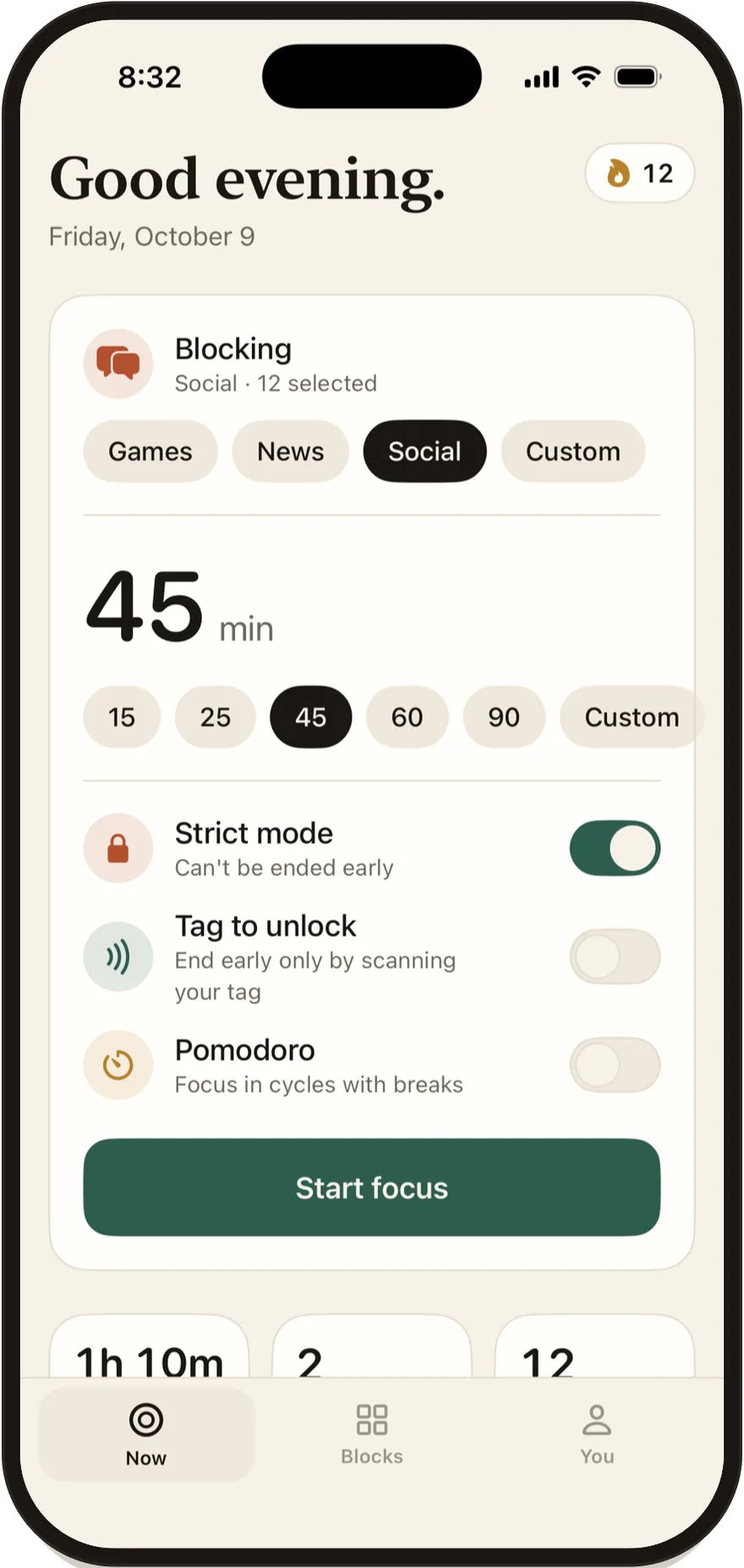
Test the setup once with a 5-minute session before you trust it with an evening. Keep the rest of the pack in a drawer. Only one tag can be registered at a time, so you can't set up a spare in advance, but once a session has ended you can register a new sticker in Settings with Replace.
One thing to keep in mind: a Stillock session always has an end time, so even if you lose every tag, the apps come back when the timer runs out. That protects you from locking yourself out by accident, and it also means you choose the length of the commitment each time. iOS always leaves another exit too: turning off Stillock's Screen Time access in Settings, or deleting the app, removes the blocks. Our guide to making an app blocker hard to bypass shows how to make that exit harder with a Screen Time passcode someone else holds.
Other Brick alternatives worth a look
These are the other tag and card blockers we checked on November 5, 2026. Some are cheaper than Stillock, and we say so.
- Foqos: free and open source. Foqos works with any NFC tag or a QR code, has the "Data Not Collected" label and 4.9 stars from about 5.7K ratings (App Store). Its code is on GitHub. It is iPhone only and in English. BGR ranked it first among Brick alternatives on August 15, 2026. Daily per-app limits and Pomodoro are not in its published feature list.
- Unpluq: its own tag plus a subscription. Unpluq uses a tag it sells and costs $6.99 per month or $59.99 per year in the App Store (listing). Its privacy label lists identifiers used to track you, and the app is iPhone only.
- TapLock: $4.99 once. TapLock works with any NFC card or sticker, has a PIN as a backup, carries "Data Not Collected", runs on iPad and comes in 8 languages (App Store).
- Bloom: an NFC card. The Bloom app is free and works with Bloom's own metal card, which BGR reported costs $39 (BGR, August 15, 2026). It runs on iPhone, iPad and Android and is available in English and Japanese (App Store).
- Latch: sticker, QR code or steps. Latch is free for one key, with Pro at $9.99 once, and lists NTAG213, NTAG215 and NTAG216 stickers as supported (latch.luklalogic.ai).
If you want strict blocking without anything physical at all, our Opal alternative comparison covers that side of the market.
Who should still buy a Brick
A Brick is still the better buy for some people:
- You want a dedicated object. A Brick is a device with one job. A sticker works on the same idea, but it takes a few minutes of setup in an app and a little discipline about where the sticker lives.
- Your household mixes Android and iPhone. Brick supports both. Stillock is for iPhone and iPad only.
- You strongly prefer paying once. $59 one time beats a subscription if you only ever want tag-based blocking.
- It is a gift. A boxed device is easier to give than an app subscription.
Stillock is the better fit if you use an iPad, want daily limits and schedules alongside the tag, prefer an app in your own language, or care that the App Store label says "Data Not Collected". For the wider field beyond tag blockers, see our guide to choosing an app blocker for iPhone.
FAQ
Can I use Stillock as a Brick alternative without buying a device?
Yes. Stillock's Tag to unlock works with any ordinary NFC sticker, so there is no proprietary device to buy. Tag to unlock is part of Stillock Pro, which costs $4.99 per month or $24.99 per year in the US.
Does Brick need a subscription?
As of November 5, 2026, Brick's site sells the device for a one-time $59 and does not mention a subscription. Brick Night costs $129 and a bundle costs $169.
Is a cheap NFC sticker as strict as a Brick?
The friction is the same idea: the key lives in another room, and you have to walk to it to end a block early. Neither is impossible to get around, because iOS lets you remove any Screen Time app's blocks in Settings or by deleting the app.
What happens if I lose my sticker?
Your Stillock session ends on its own when its time is up, and no session lasts longer than 3 hours. Once it has ended, you can register a new sticker in Settings (Unlock tag, then Replace), with no support email needed. The tag can't be changed while a tag-locked session is running.
Does Stillock work on Android?
No. Stillock runs on iPhone and iPad with iOS 17 or iPadOS 17 or later. If you need Android support, Brick works on Android 12 or later according to its FAQ.