An NFC app blocker keeps your distracting apps locked until you tap your iPhone on a small tag that you keep somewhere else, ideally in another room. On iPhone, Apple's Screen Time does the blocking and the app only reads the tag. In Stillock, Tag to unlock works with any ordinary NFC sticker, and every session still ends on its own when its time is up.
Why a physical app blocker works when willpower doesn't
Most limits you set for yourself fail at the same moment: the way out sits on the same screen as the app. Screen Time's limit screen offers "Ignore Limit", and a passcode you chose yourself is a passcode you know. We cover that problem in our guide to why Screen Time's "Ignore Limit" is so easy to tap.
A physical tag moves the way out off the screen. To end a blocked session early, you have to stand up, go to the tag and hold your phone against it. The walk is short, but it breaks the automatic part of the habit. By the time you reach the kitchen, you have had a moment to decide whether you still want to.
This is the idea behind Brick, a $59 NFC device you tap to block and unblock your phone (getbrick.com, checked November 5, 2026). You don't need a dedicated device for the same effect: any NFC sticker can be the thing you have to walk to.
Friction is not a lock. It works because most scrolling is impulsive, not planned. The ways around it are covered further down.
How NFC unlock works on iPhone
Two separate parts of iOS do the work.
Screen Time does the blocking. Apps like Stillock use Apple's Screen Time framework (FamilyControls) to block apps. You choose the apps, categories and websites in Apple's own picker, iOS gives the app encrypted tokens instead of app names, and iOS itself shows a shield when you try to open a blocked app. Stillock cannot see which apps you picked, and the blocking happens on your iPhone.
Core NFC reads the tag. Core NFC is the part of iOS that lets an app read NFC tags. When the app starts a scan, your iPhone shows a scanning sheet and you hold the top of the phone close to the tag. NFC tags have no battery: the phone's reader powers the chip for the moment it is read, which is why it only works within a few centimeters.
The tag only ends the session early. The sticker does not store your apps, your settings or your schedule. It works like a key. When you scan the tag you registered, Stillock asks Screen Time to lift the block before the timer runs out. If you never scan it, nothing breaks: the session keeps running until its time is up and then ends on its own.
Stillock does the same: it reads only the tag's hardware ID, never writes anything to the tag, and keeps that ID only on your iPhone. Apple's own Shortcuts app treats tags in a similar way. According to Apple's Shortcuts guide, an NFC tag automation ignores the contents of the tag other than its unique identifier. That is why a plain, blank sticker is enough for this kind of job.
Stillock needs iOS 17 or later, and every iPhone that can run iOS 17 has an NFC reader that apps can use. That covers the iPhone XS, XR and SE (2nd generation) and every later model, per Apple's list of iOS 17 models. iPads have no NFC reader, so Tag to unlock is an iPhone feature: the switch is still shown on an iPad, but no tag can be registered there, so a tag-locked session can't be started on it. Each device runs its own sessions, and a tag-locked session on your iPhone blocks nothing on your iPad.
Which NFC tags to buy for an app blocker
Any ordinary NFC tag works with Stillock. There is no proprietary hardware to buy. Here is what to look for in a shop listing:
- Chip: NTAG213, NTAG215 or NTAG216. These are the common, cheap NFC chips, and other tag-unlock apps such as Latch list all three as supported (checked November 5, 2026). They differ mainly in how much data they can hold. A tag that only acts as a key needs very little, so the cheapest one, NTAG213, is usually enough. Stillock reads the same family of chips, so stickers, cards and key fobs of these types are what to buy; bank cards and most transit cards aren't read.
- Format: stickers, cards or key fobs. A sticker is best for a wall, a door or the inside of a cupboard. A card or key fob is easier to put in a drawer or to hand to someone else.
- Surface: not directly on metal. Metal interferes with NFC, so a normal sticker on a fridge door or a metal locker may not read. Look for tags sold as "on-metal" or "anti-metal" for those spots.
- Price: packs are cheap. A MakeUseOf writer who built a Brick-style setup put a 10-pack of NFC tags at about $5 (MakeUseOf, February 28, 2026).
Buy a pack rather than a single tag, so you have a replacement for later. Then test one with a 5-minute session, the shortest length Stillock offers: start it, walk to the tag's spot and end it with a scan. If the tag reads on the first or second try from where it will live, it is a good tag.
How to set up Tag to unlock in Stillock
Tag to unlock is part of Stillock Pro, which costs $4.99 per month or $24.99 per year in the US. The yearly plan starts with a 7-day free trial. Focus sessions themselves are free and unlimited.
- Install Stillock and allow Screen Time access when the app asks. There is no account to create.
- Make a block group with the apps, categories and websites that pull you in. The free version includes one block group.
- In the Settings tab, open Unlock tag and tap Register. iOS shows its scanning sheet ("Hold your iPhone near the tag."), and the row then reads "Registered. Scan it to end a tag-locked session."
- On the Now tab, turn on Tag to unlock, pick a session length, anywhere from 5 minutes to 3 hours, and start the session. You don't need strict mode on top: a tag-locked session already has no End button, no break and no "5 more minutes", and the two switches can't be on at the same time.
- Put the tag in its spot, away from where you use your phone.
- To end the session early, go to the tag, tap Scan tag to end on the running session and hold your iPhone near it. A different tag gets "That's not your tag." If you leave it, the session ends on its own when the time is up.
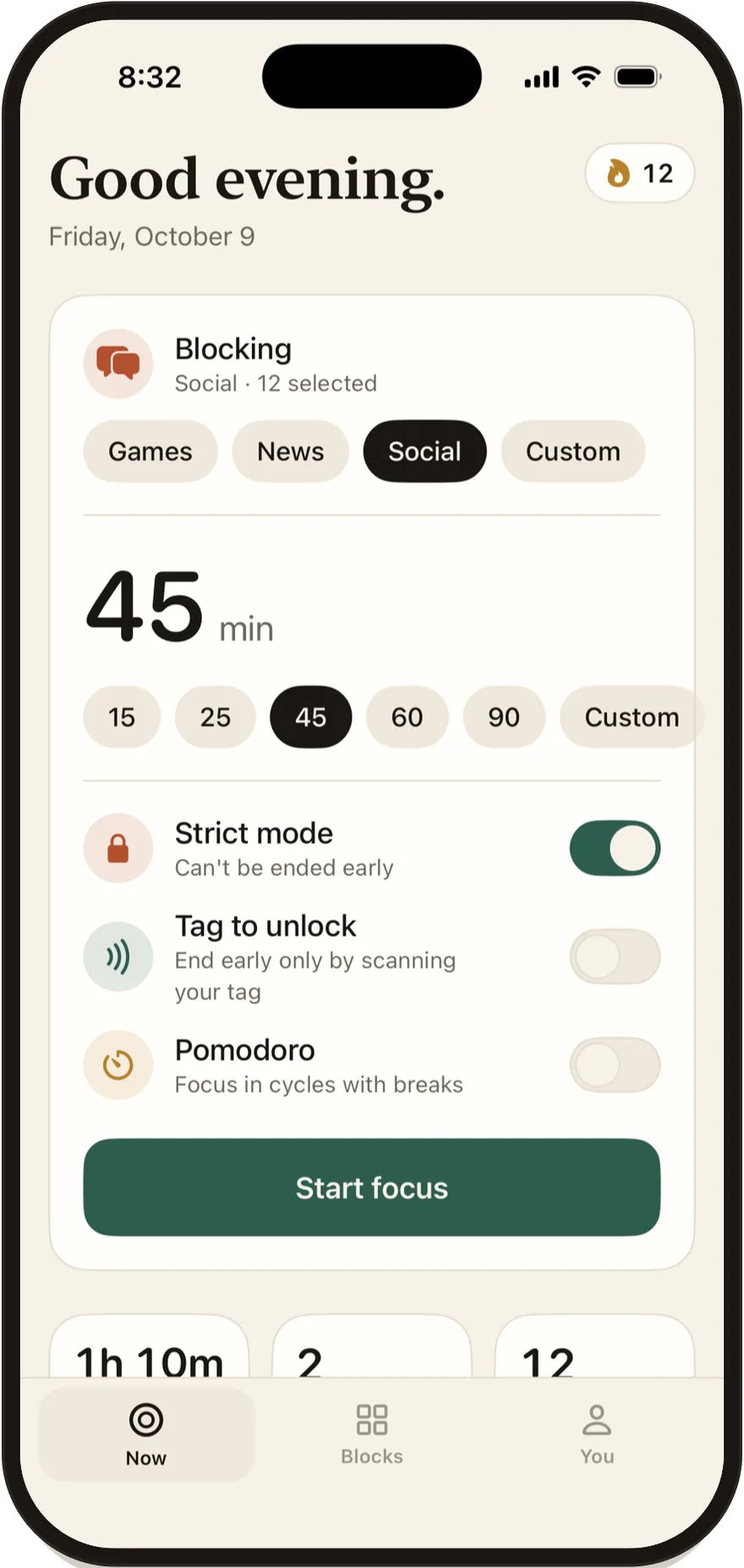
During a tag-locked session, the "5 more minutes" option is not available, so the tag really is the only early way out inside the app. The countdown shows on your Lock Screen and in the Dynamic Island while the session runs.

Where to put your NFC tag
The right spot is far enough away that you have to get up, and close enough that you can still reach it for a real reason. Stillock's own suggestion is "an NFC tag you keep in another room". Spots that work well:
- The kitchen or the hallway. At home, a different room is the simplest rule to keep.
- Inside a cupboard or a drawer. Out of sight helps you forget it until you need it.
- Your car. For evenings at home, unlocking then means putting on shoes and going outside.
- A locker or a drawer at work. Good for deep work blocks at the office.
- With someone you live with. A card or key fob can go to a partner or housemate, who then decides how easily you get it back.
Avoid your bedside table, your desk, your phone case, your wallet and your keys. If the tag is always within reach, the walk disappears and so does the effect.
A second tag can start sessions instead of ending them. Apple's Shortcuts app can run an automation when you scan an NFC tag, and Stillock's "Start Focus" shortcut starts a session with the group and options you last chose on the Now tab, with an optional number of minutes. Stillock opens in front when it runs, so the start isn't silent, but a sticker on your desk can still become a "start focus" button.
What happens if you lose your NFC tag
Losing the tag is less dramatic than it sounds:
- The session ends anyway. Every Stillock session and schedule ends on its own when its time is up, even if you lose your tag. A single focus session lasts 3 hours at most.
- iOS keeps an exit open. iOS always lets you remove all of Stillock's blocks by turning off its Screen Time access in Settings or by deleting the app. Stillock's FAQ and terms say so plainly.
- A spare tag from the pack can take over, afterwards. Only one tag can be registered at a time, and the tag can't be changed while a tag-locked session is running. Once the session has ended, open Settings, then Unlock tag, and tap Replace to register the new tag in place of the lost one (or Forget tag, then Register).
Compare that with Brick: per NBC Select's review (updated August 14, 2026), Brick gives you five "Emergency Unbricks" per account, and after that you have to email support to get more.
The Settings exit can be made harder, too. Freedom's support documentation reports that since iOS 26.4, once a Screen Time passcode is set, that passcode is required to turn off Screen Time access for any app (support.freedom.to, checked November 5, 2026). If someone else holds the passcode, the Settings exit needs them as well. Our guide to an app blocker you can't easily bypass walks through that setup.
Limitation: An NFC tag adds friction; it is not a lock that can't be opened. iOS always lets you turn off Stillock's Screen Time access in Settings or delete the app, and either one removes every block. Tag to unlock also needs an iPhone, because iPads have no NFC reader. Never put apps you might need in an emergency, such as messaging, maps, health or sign-in apps, behind a tag.
NFC app blockers compared: Brick, Unpluq, Foqos, TapLock and Stillock
Disclosure: We make Stillock. Prices and features of other apps were checked on November 5, 2026 and link to their sources; tell us if something is out of date.
| App | What unlocks it | Price (US) | Platforms | Languages | App Store privacy label |
|---|---|---|---|---|---|
| Brick | Brick's own NFC device | $59 one-time; Brick Night $129 (site) | iOS 18+ and Android 12+ (FAQ); iPhone only, no iPad app (listing) | English | Data linked to you |
| Unpluq | Unpluq's own NFC tag | Subscription: $6.99 per month or $59.99 per year (listing) | iPhone only on the App Store; also Android | 6 | Data used to track you: identifiers |
| Foqos | Any NFC tag or a QR code | Free, open source, optional tips (listing) | iPhone only, iOS 17.6+ | English | Data Not Collected |
| TapLock | Any NFC card or sticker, with a PIN as backup | $4.99 one-time (listing) | iPhone and iPad | 8 | Data Not Collected |
| Stillock | Any ordinary NFC tag | Free; Tag to unlock needs Pro, $4.99 per month or $24.99 per year (listing) | iPhone and iPad, iOS 17+ (tag scanning on iPhone) | 16 | Data Not Collected |
Foqos is the one to beat on price. It is free and open source, and it has 4.9 stars from about 5.7K ratings on the US App Store. BGR named it the top Brick alternative in its August 15, 2026 roundup. If all you want is tag-locked sessions on an iPhone, in English, Foqos is a very good choice.
TapLock is the cheapest paid option at $4.99 once, and it runs on iPad. Brick and Unpluq sell their own hardware; more on Brick, including when it is still the right buy, is in our Brick alternative comparison.
Where Stillock fits. Stillock is not the cheapest way to use an NFC tag, and Tag to unlock is a Pro feature. What Pro buys is a complete blocker around the tag: daily limits (for example 30 minutes of social media, then blocked until midnight), schedules and strict schedules, Pomodoro, weekly insights, 16 languages, and layouts for iPad and iPhone Duo. Foqos's feature list on GitHub covers sessions, timers, breaks, stats, streaks and schedules, but does not list daily per-app limits or Pomodoro as of November 5, 2026. For a wider look at the category, read how app blockers for iPhone work and how to choose one.
FAQ
Do I need a special NFC tag for Stillock?
No. Stillock's Tag to unlock works with any ordinary NFC tag, and there is no proprietary hardware. Cheap NTAG213, NTAG215 or NTAG216 stickers are the common choice; test one with a 5-minute session before you rely on it.
Which iPhones can use an NFC app blocker?
Stillock needs iOS 17 or later, and every iPhone that runs iOS 17 has an NFC reader that apps can use. That includes the iPhone XS, XR and SE (2nd generation) and every newer model.
Does Tag to unlock need an internet connection?
Stillock has no account and no servers, and both the tag scan and the Screen Time block happen on your iPhone; nothing is sent anywhere. You should not need a connection to end a session with your tag.
Can I use a transit card, bank card or AirTag as my tag?
Use a separate NFC sticker instead. Bank cards and most transit cards aren't read by Stillock, and we haven't tested AirTags. Besides, anything you carry everywhere makes the unlock too easy, which defeats the purpose of walking to a tag.
What happens if I lose my NFC tag?
Your session still ends on its own when its time is up, and no session lasts longer than 3 hours. iOS also always lets you remove Stillock's blocks by turning off its Screen Time access in Settings or by deleting the app.
Does Tag to unlock work on iPad?
No. iPads have no NFC reader, so no tag can be registered on an iPad and a tag-locked session can't be started there, even though the switch is shown. Stillock itself runs on iPad with its own layout, and focus sessions, including strict ones, work there the same way as on iPhone.